Kit 6 - Black Friday 2025 - The Good Pack
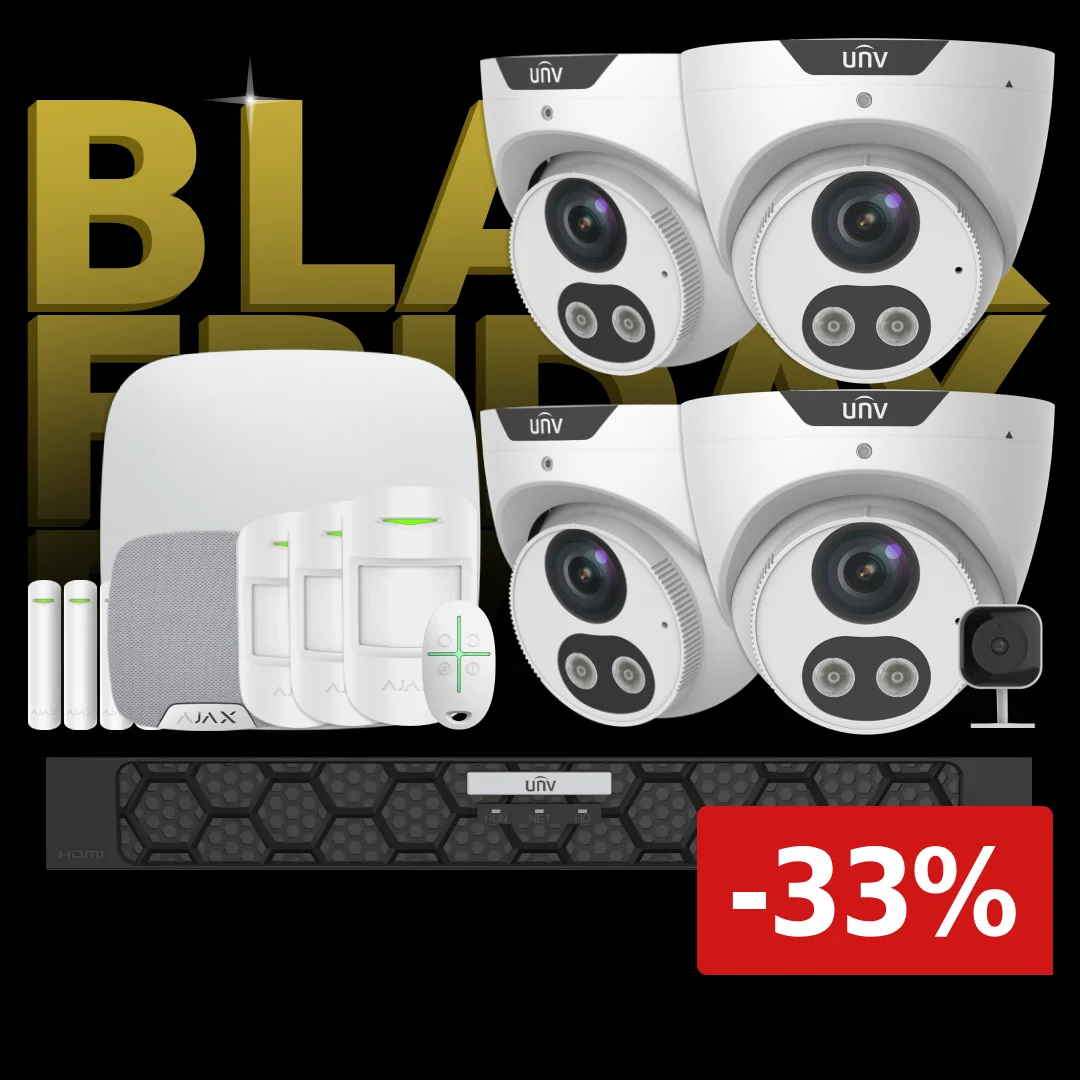
Complete Pro package with cameras and alarm system
- Powerful 8-channel recorder with expansion options.
- Four 8MP IP cameras for outdoor mounting
- 2MP indoor WiFi camera with microphone
- Cameras have person and vehicle detection
- Smart hybrid lighting with automatic switching between IR and white light.
- Ajax alarm system with sensors, siren and remote control
- Option to choose color of the units
Manage the system easily from your phone - with no subscription or hidden fees.
And best of all, one of our experts is included in the package to help with the configuration.
Limited quantities available and the promo package runs all week or while stocks last.
NB! If you choose 'bank transfer' at checkout, the offer is reserved for one hour. If payment is not received within one hour of ordering, the order is canceled and the item is no longer reserved.
Complete Pro package with monitoring, alarm and online setup
This package combines the best of both worlds: a powerful surveillance system and a reliable alarm system. You get four 8MP turret cameras, a Pro recorder with advanced analytics, an indoor WiFi camera and a complete Ajax alarm system with contacts, motion detectors and a siren. A complete security package that covers the whole home or business.
What’s included
- 1 x Uniview 8-channel PRO NVR with PoE
- 4 x 8MP Turret cameras with speaker, microphone and strobe light
- 1 x 2MP indoor wireless WIFI camera
- 1 x 4TB hard drive
- 4 x 20-meter network cables
- 1 x 0.5m network cable
- 1 x Ajax PRO control panel
- 4 x Door/window contacts with double protection
- 3 x Motion detectors
- 1 x Indoor siren
- 1 x Remote control
- 4 Surveillance stickers
- 4 Alarm stickers
- Online programming of your system
Person and vehicle detection
The cameras include built-in analytics that can tell people and vehicles apart. You can choose whether you want regular motion-triggered recordings — which can include trees and bushes moving in the wind — or only recordings that contain people and vehicles. You can even set how large or small objects must be to be detected. That means you can define how close an object must be to a target to be captured.
Online programming included
After you’ve mounted the cameras and connected the recorder, we log in online and guide you through the entire setup. We configure recordings, app connection, notifications and fine-tune the system so everything works optimally.
PRO recorder with advanced video analysis
The recorder can handle up to eight cameras and is equipped with intelligent analysis functions. That makes it possible to get more precise events — for example person detection, vehicle detection, line crossing or monitoring specific zones. That means fewer irrelevant notifications and a clearer overview. Together with the large hard drive you get a stable solution that runs 24/7.
Read more here: NVR501-08B-P8
8MP cameras with strobe, microphone and speaker - (Option in black)
The four included turret cameras deliver ultra-sharp 8MP images so you can recognize people, license plates and details even at a distance. The cameras have a built-in microphone and speaker so you can hear what’s happening and speak back through the app. The strobe light can flash on motion, which works effectively as a deterrent. The cameras are suitable for driveways, entrances, terraces or indoor areas where you want high quality and clear recordings.
Read more here: IPC3615SB-ADF40KMC-I0
2MP WiFi Cube camera – C1L-2WN-G
This camera is designed for indoor use and for those who want a quick setup. It runs on WiFi and therefore requires no cabling. It’s well suited for rooms with activity — e.g. entrances, children’s rooms, offices or living rooms. The camera delivers good image quality for indoor conditions and reacts quickly when something happens.
Read more here: C1L-2WN-G
4TB WD Purple hard drive
The included hard drive is developed specifically for continuous video recording. It’s built for 24/7 operation and can handle many simultaneous video streams without compromising stability. 4TB gives plenty of space for several days or weeks of recordings — depending on settings and number of cameras.
Read more here: WD Purple 2TB
Ajax PRO control - HUB 2 Plus (Option in black)
Hub 2 Plus is the brain of the alarm system. It communicates wirelessly with all sensors and ensures that alarms are quickly forwarded to the app. It has multiple communication paths, which increases reliability, and supports photo verification from connected detectors.
Read more here: Hub 2 Plus
AJAX door/window contacts with extra protection - DoorProtect Plus (Option in black)
These contacts provide extra security because they react not only to opening but also to vibrations and tilt. That means they can detect intrusion attempts before the door or window is actually opened. They are suitable for patio doors, basement doors and exposed windows.
Read more here: Doorprtect Plus
Ajax motion detectors - MotionProtect (Option in black)
The motion detectors are suitable for common areas like living rooms and hallways. They detect human movement accurately and ignore small animals, so the risk of false alarms is low. They cover large areas and react quickly.
Read more here: Motionprotect
Ajax Indoor siren - Homesiren (Option in black)
HomeSiren provides a clear and sharp alarm sound if the system detects an intrusion. The siren is placed indoors and works effectively as a deterrent, since the sound is loud enough to attract attention in the house.
Read more here: Homesiren
Ajax remote control - SpaceControl (Option in black)
The remote makes it easy to arm or disarm the alarm without the app. It also has a panic button that can be used in emergencies. User-friendly and suitable for children, the elderly or users without a smartphone.
Read more here: Speccontrol
SIM card
There’s the option to insert a SIM card in the control panel. The advantage of having a SIM card is that it can call you if the alarm goes off.
If there is no SIM card in the alarm system, it can only send push notifications.
You can get a SIM card from your regular provider, or order one from us. It costs 50,- per month and has no contract.
Read more about it here: SIM card
Would you like the units in black instead?
It’s possible to change the turret cameras and all Ajax devices to black. Do this by adding everything to the cart and writing in the comment field which devices you want changed to black.

The cameras are very reliable and are tested both by the manufacturer and by us:
Watch a video about an intelligent Uniview recorder here:
A smart and intelligent hard disk recorder
Brilliant app for video surveillance
Uniview has made some really great apps that work on both operating systems (Android and iOS) — and they’re designed so similarly that you can barely tell the difference. In a few steps you have access to your video surveillance and all the benefits that come with it:
From the app you can
- Add and remove systems on your account.
- Update both cameras and recorder with a few clicks. It finds the latest firmware for both NVR and camera automatically — and even notifies you when new firmware is released.
- Set time, daylight saving time, motion detection, lighting and image settings.
- Create VCA rules like line crossing, intrusion detection, entry and exit area (these are the rules used to receive alerts, not motion detection).
- Create smart playback so you can view recordings that contain people and vehicles.
- Control cameras that are movable (PTZ cameras).
You can actually watch a complete video guide we made about the app here:
Lightning-fast startup and image display
EZView is definitely one of the fastest apps we’ve tested. If you have a reasonable internet speed, it typically finishes loading within a second.
Smart playback features
When you want to view recorded files, you can easily choose whether to play 24-hour continuous recording, regular motion-detection, or only the times when VCA rules were triggered. These features make it super easy and quick to review the day’s events.
If you find what you were looking for, you can easily download it to your phone or send it directly to the police or other recipients via email, Dropbox, WhatsApp, Signal and many other services.
Get alerts with links
When a person or vehicle, for example, crosses a line, stays in an area or breaks one of your other rules, you can get an immediate notification on your phone. There’s very little delay between the alert being sent and you receiving it. The notification also includes a built-in link to the "live view" and playback from the camera that sent the alert. That lets you make the right decision quickly and thereby limit damage.
Set up VCA rules directly in the app
VCA (Video Content Analysis) is your watchdog. It’s the function that detects people and vehicles if they break the rules you’ve set. An example rule could be that you want to be notified when a car drives into your driveway, but not when it drives out. You can set these functions directly in the app, which is great because very few surveillance manufacturers offer this.
Share, share, share
You can easily share cameras you want directly from your phone and revoke the sharing when you no longer want it. You can even choose exactly what permissions a person should have, e.g. whether they can view live streaming, play recordings, hear audio, control PTZ cameras, etc.
Smart search functions
The recorders have a lot of smart features that make it very easy to find interesting events and filter out the rest.
In general you can search in several different ways.
In the app you can choose between:
- 24/7 recordings
- Motion recordings
- Intelligent recordings (VCA)
On the local interface you can choose between:
- 24/7 recordings
- Motion recordings
- Intelligent recordings (VCA)
- License plates
- Faces, etc.
On the computer you can choose between:
- 24/7 recordings
- Motion recordings
- Intelligent recordings (VCA)
- Faces, etc.
Connect your Uniview cameras and recorder to your Ajax alarm system
Uniview is one of the most popular surveillance systems on the market, one of the largest manufacturers in the world, and you can connect them directly to your AJAX system
Because AJAX and Uniview are both major players on the market, they’ve chosen to make their systems mutually compatible. They’ve even done it in a way that makes it super easy for you as a user so you don’t need an engineering degree to get it working. When the cameras are connected to your AJAX system, you can assign them to the rooms where they’re located in or around.
Why connect video surveillance to the alarm system?
Most video surveillance systems already have their own dedicated app to view cameras, play recordings, set up VCA rules and much more. But imagine that when the alarm starts and every second counts, you don’t have to switch apps — you get an image tied directly to the area where the detectors triggered. You can even add an entire recorder directly and then switch between cameras in the AJAX app.
This feature is not intended to replace the original camera system app, but to supplement daily use so you can get a quick overview of the area where the alarm started without switching apps.
How does it work?
Using the AJAX app, you can both control your alarm, view your surveillance and associate cameras with areas — so if an alarm goes off, you can quickly see what’s happening in the rooms where the alarm was triggered.
Our experts help with the actual setup — and it’s all included in the offer.