BlackVue DR970X-1CH Plus II 4K Dashcam with Cloud and Parking Monitoring

8MP car camera with single front camera and parking monitoring via Cloud
- 4K Ultra HD front
- Front camera: Sony STARVIS 2 sensor – delivers sharp footage even in low light
- Built-in GPS and Wi‑Fi
- Supports Cloud with LTE module
- Parking monitoring with motion and impact detection
- Built-in speaker and microphone
Really nice dashcam that delivers high quality and advanced features in a compact design.
| Comparison Table |
| Technical specifications | |
| Model | DR970X-1CH Plus II |
| Product type | 1-channel 4K UHD dash camera |
| Color | Black |
| Dimensions (L × W × H) | 118.6 × 47.4 × 36 mm |
| Weight | 115 g |
| Memory card | microSD, 64 GB / 128 GB / 256 GB / 512 GB |
| Camera | |
| Image sensor | STARVIS 2 CMOS sensor, approx. 8.4 MP |
| Viewing angle | Diagonal: 146° / Horizontal: 125° / Vertical: 68° |
| Video resolution | 4K UHD, 3840 × 2160 |
| Frame rate | 30 fps |
| Frame rate note | Frame rate may vary during Wi-Fi streaming |
| Recording | |
| Recording modes | Normal recording / Event recording / Manual recording / Parking recording |
| Event recording | Triggered when impact is detected in normal or parking mode |
| Parking recording | Triggered when motion is detected |
| Parking mode with hardwiring cable | ACC+ triggers parking mode |
| Parking mode with other power methods | G-sensor triggers parking mode |
| Acceleration sensor | 3-axis acceleration sensor |
| Video | |
| Video codecs | H.265 (HEVC) / H.264 (AVC) |
| Video file format | MP4 |
| Extreme image quality | 60 Mbps |
| Highest image quality | 25 Mbps |
| High image quality | 12 Mbps |
| Normal image quality | 8 Mbps |
| 60 Mbps requirement | 60 Mbps bitrate is supported only with H.265 (HEVC) |
| Wireless & positioning | |
| Wi-Fi | Built-in, IEEE 802.11 a/b/g/n/ac |
| GPS | Built-in dual-band GPS / GLONASS |
| Bluetooth | Built-in, Bluetooth V2.1+EDR / 4.2 |
| Audio | |
| Microphone | Built-in |
| Speaker | Built-in with voice guidance |
| Indicators & controls | |
| LED indicators | Recording LED / GPS LED / Bluetooth-Wi-Fi-LTE LED / Front Security LED |
| Format button | Supported |
| microSD formatting | Press and hold the format button for 5 seconds until a beep, release it, then press and hold again for 5 seconds and release after the second beep |
| Touch sensor | Supported |
| Touch sensor function | Can trigger manual recording depending on firmware settings |
| Power supply | |
| Input voltage | 12–24 V DC |
| Power connector | 3-pole DC plug, Ø3.5 × Ø1.1 mm |
| Power wiring | Black: GND / Yellow: B+ / Red: ACC |
| Backup power | Built-in super capacitor |
| Normal mode power consumption | Approx. 340 mA at 12 V, GPS on, 1 channel |
| Parking mode power consumption | Approx. 260 mA at 12 V, GPS off, 1 channel |
| Power consumption note | Actual power consumption may vary depending on operating conditions and environment |
| Environment | |
| Operating temperature | –20 °C to +70 °C (–4 °F to 158 °F) |
| Storage temperature | –20 °C to +80 °C (–4 °F to 176 °F) |
| High temperature cut-off | Approx. 75 °C (167 °F) |
| Software | |
| Mobile application | BlackVue Application |
| Android compatibility | Android 8.0 or higher |
| iOS compatibility | iOS 13.0 or higher |
| Desktop software | BlackVue Viewer |
| Windows compatibility | Windows 7 or higher |
| macOS compatibility | Mac Sierra OS X 10.12 or higher |
| Web software | BlackVue Web Viewer |
| Chrome compatibility | Chrome 71 or higher |
| Safari compatibility | Safari 13.0 or higher |
| Other functions | |
| File management system | Adaptive Format Free File Management System |
| Certifications | |
| Certifications | FCC / ISED / CE / UKCA / RCM / RoHS / Telec / KC / WEEE |
| Der tages forbehold for eventuelle fejl og ændringer i specifikationerne / Specifications are subject to change without notice. Errors and omissions excepted. | |
There is no reviews yet. Be the first to write us your opinion
Professional car camera with 4K recording and parking detection
This is one of BlackVue's top cameras. It records in Ultra HD and will automatically start recording in a parking lot if something hits your car.
Records in high quality
The front-mounted camera records in Ultra HD (4K). The front camera features a built-in Sony STARVIS 2 image sensor, developed specifically for surveillance and car cameras. The technology lets the camera see well even in poor lighting.
- 4K Ultra HD front (8.4 MP)
- Front camera: Sony STARVIS 2 image sensor
Built-in GPS and Wi‑Fi
The camera has built-in GPS and Wi‑Fi, making it easier to access your recordings.
The Wi‑Fi connection is used to access the camera wirelessly from an app on your phone or via a computer. From there you can view live footage, download videos, or change settings without removing the SD card from the camera.
The built-in GPS logs your route and speed so you can easily see where an event occurred.
Parking monitoring
The camera can monitor the car while it's parked. If motion or impact is detected, it will start recording automatically.
This happens either via the vehicle's ignition signal (ACC) or using the built-in G-sensor—depending on how the camera is connected.
A hardwire cable is included so you can use parking mode without buying extra accessories. If activity is detected around the car while it's off, you'll get a voice alert when you start the car again.
Easy to operate
The camera has a touch sensor that makes it easy to start a manual recording if you see something you want to save quickly. There's also a dedicated button to format the SD card directly on the unit.
You’ll be warned if it stops recording
The system has built-in monitoring of the SD card and will alert you if errors occur. It can also restart itself automatically at intervals to keep running stably. Important recordings are protected from being overwritten.
Power and connections
The camera is connected via three wires: GND (ground), B+ (constant power) and ACC (ignition). It supports both 12V and 24V, so it can be used in both cars and vans.
Power consumption is approx. 480mA during normal driving and 370mA in parking mode.
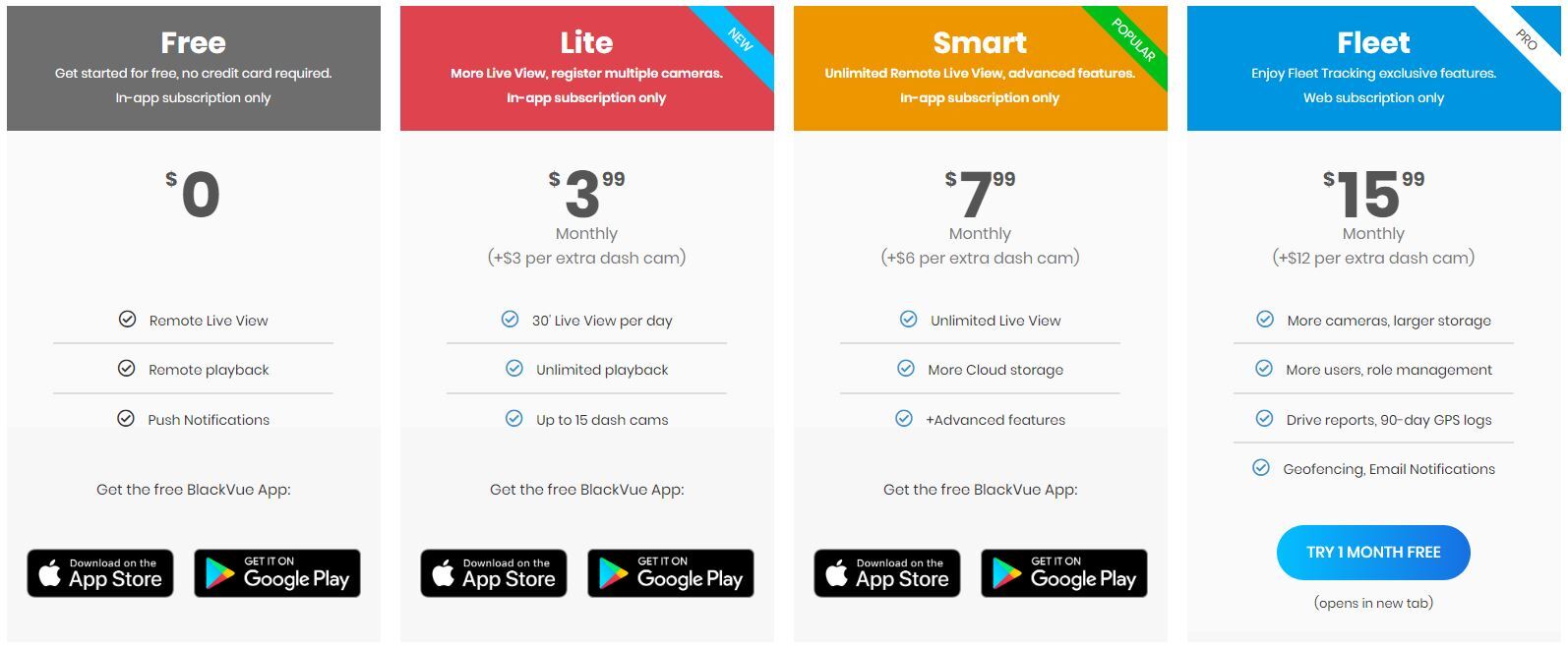
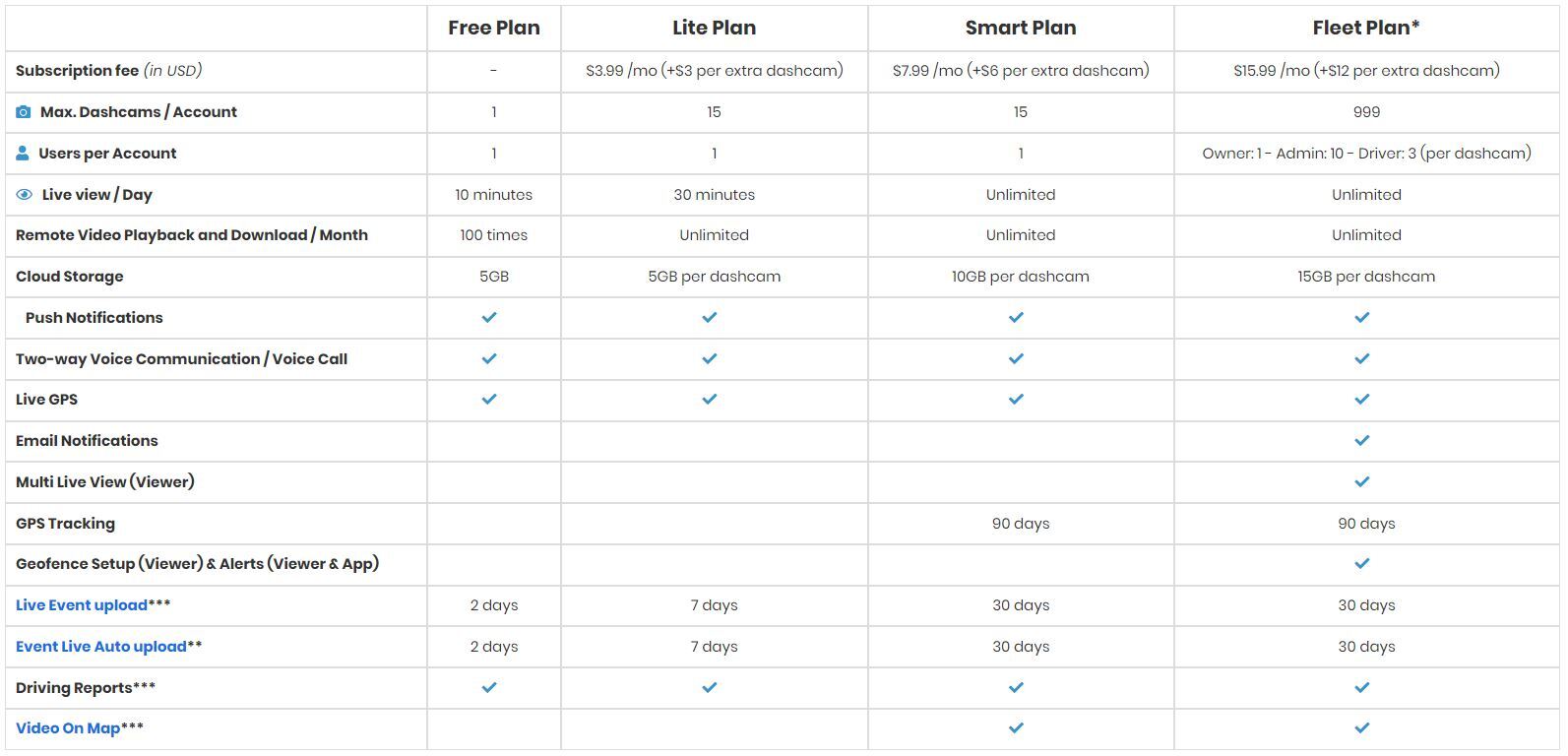
Built-in Cloud
With BlackVue Cloud you can access the camera live, get notifications about events and view video recordings directly on your phone. This feature requires you to purchase and connect a separate LTE module.
App and software
You can use the BlackVue app for both Android and iOS to view live, download recordings and change settings. It can also be done from either a PC or a Mac.
The software supports both Chrome and Safari.
Technical specifications
- Recording: 4K Ultra HD (8.4 MP)
- Sensor: Sony STARVIS 2 (front)
- Field of view: 146° (front)
- Wi‑Fi: Built-in dual-band 2.4GHz / 5GHz
- GPS: Built-in (dual-band GPS + GLONASS)
- Parking mode: Yes, with voice alert (hardwire cable included)
- Supported memory: microSD up to 1TB
- Video format: MP4 / H.265 (HEVC) and H.264 (AVC)
- File protection: Up to 50 events protected from being overwritten
- Power consumption: Approx. 480mA (normal) / 370mA (parking)
- Operating temperature: -20 °C to +70 °C
- Backup power: Built-in supercapacitor
- Size: 118.6 × 47.4 × 36 mm
- Weight: 115g
- Cloud access: Yes (requires LTE module, sold separately)
- Software: BlackVue app (Android/iOS) and Viewer (Windows/Mac)