Network Cable Without Connectors
Network Cable on Reel
Here you will find installation cables without pre-installed connectors. The cables are supplied on reels and are ideal for permanent cable installations between, for example, surveillance cameras, network outlets, switches and recorders.
Without connectors fitted, the cable is easier to route through walls, ceilings, conduits and small openings. You can also cut each cable run to the required length and avoid unnecessary excess cable.
Please note that you must install RJ45 connectors yourself or terminate the cable in a network outlet. This requires suitable connectors and tools.
See the guide for installing connectors further down this page.
```

How do I install connectors on a network cable?
Are you ready to master the art of installing your own network connector? By routing the cable without connectors and attaching the RJ45 connectors afterwards, you can achieve a clean and efficient installation. Instead of drilling large holes to pass pre-terminated cables through, this method often allows you to use holes as small as 5–6 mm.
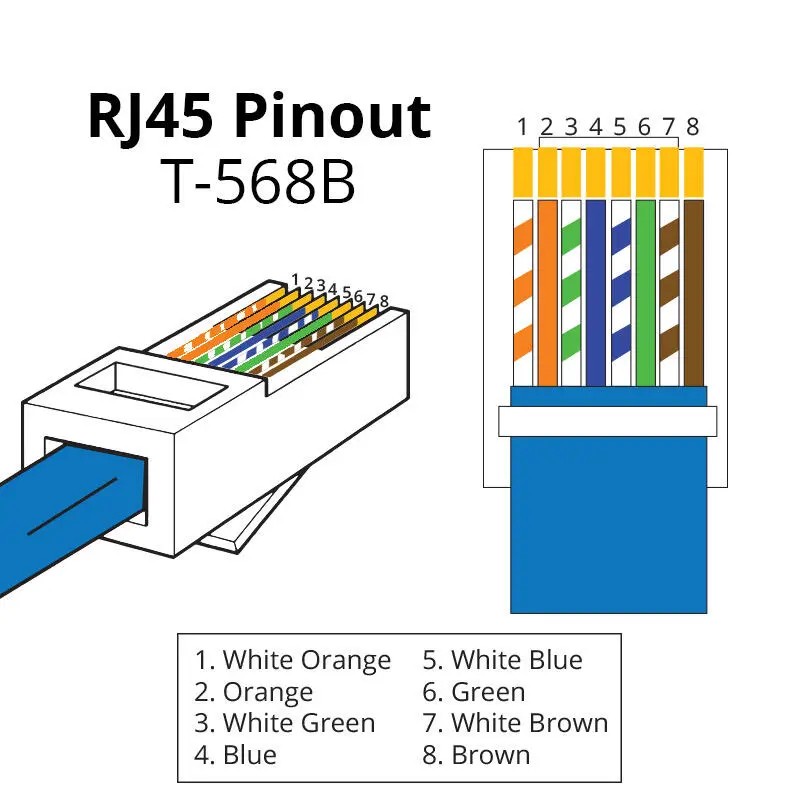
Making your own network cable is not difficult if you have the right tools and know the Ethernet wiring colour codes. Whether you are working with Cat6 or Cat5e network cable, the principles are the same. On this page you will find detailed instructions, video tutorials and a complete overview of Ethernet connector colour codes. Read more further down this page...
Which installation cable should I choose?
Your choice mainly depends on where the cable will be installed and whether it will be used for PoE.
Indoor or outdoor
For indoor installations, you can use a standard indoor installation cable.
If the cable will be installed outdoors, choose a cable designed for outdoor use with a UV-resistant jacket. A standard indoor cable should not be permanently installed outdoors, as sunlight, moisture and temperature changes can damage the cable jacket.
Standard or shielded cable (UTP or FTP)
A standard unshielded (UTP) network cable is suitable for most installations in homes and small businesses.
A shielded cable (FTP) provides additional protection against electrical interference and may be beneficial if the cable is installed close to other cables or electrical equipment. Shielded installations require compatible shielded connectors, outlets and other components.
Which RJ45 connectors should I use?
Different cables have slightly different diameters, so it is important to choose the correct RJ45 connectors.
Use Cat6 RJ45 connectors for Cat6 cable and Cat5e RJ45 connectors for Cat5e cable.
For shielded cable (FTP), use shielded RJ45 connectors. Shielded connectors can also be used with unshielded cable, but they provide no benefit and may only create confusion.
Network cable for PoE
Many surveillance cameras receive both power and network connectivity through the same cable using PoE.
For PoE and longer cable runs, we generally recommend choosing a cable with 100% copper conductors. Always select a cable that is specified as suitable for the intended installation and PoE load.
What tools do I need to assemble my own network cables?
You will need a crimping tool to attach the RJ45 connectors to the cable. As shown in the video, you only need to strip the outer jacket—the individual conductors should not be stripped.
We also offer the crimping tool, which you can find here: RJ45 Crimping Tool (compatible with both Cat5e and Cat6)
```