Bosch NBN-63023-B 2MP Hybrid (Analog and IP) Box Camera
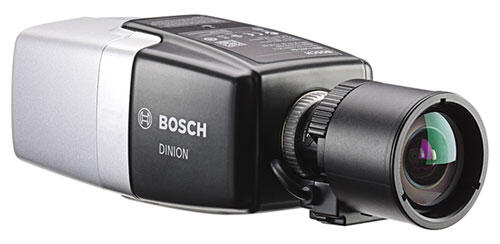
Bosch Hybrid box camera that can run both analog and IP
- Can run analog or IP.
- Box camera that must be mounted in a camera housing.
- Starlight function for good performance in low light.
- Option for different lenses.
- NDAA-compliant.
| Download |
| Datasheet |
| Technical specifications | |
| Model | NBN-63023-B |
| Product name | Bosch DINION IP starlight 6000 HD |
| Product type | 2 MP / 1080p IP box camera with Starlight, Essential Video Analytics and hybrid IP/analog output |
| Camera type | Box camera |
| Image sensor | 1/2.8" CMOS |
| Effective pixels | 1920 × 1080 |
| Resolution | 2 MP / Full HD 1080p |
| Maximum frame rate | Up to 60 fps |
| Low-light technology | Bosch Starlight |
| Video analytics | Essential Video Analytics |
| Hybrid operation | Simultaneous IP video and analog CVBS video output |
| Color | RAL 9007 Metallic Titanium |
| Imaging & low-light performance | |
| Minimum illumination – Color | 0.0069 lux at 30 IRE, F1.2, 1/25 s |
| Minimum illumination – Monochrome | 0.0008 lux at 30 IRE, F1.2, 1/25 s |
| Dynamic range | 120 dB WDR in HDR mode |
| Measured dynamic range | 110 dB according to IEC 62676 Part 5 |
| HDR technology | 10-bit, 3-exposure Extended Dynamic Range |
| Day / Night | True day/night with mechanical IR-cut filter |
| Day / Night modes | Auto with adjustable switching points, Color, Monochrome |
| Content Based Imaging Technology | Supported |
| Intelligent Dynamic Noise Reduction | Supported; designed to reduce bandwidth and storage requirements by up to 50% |
| Intelligent Defog | Supported |
| Backlight compensation | On / Off |
| Contrast enhancement | On / Off |
| Sharpness enhancement | Adjustable |
| Picture settings | Contrast, saturation and brightness |
| White balance range | 2500–10,000 K |
| White balance modes | Basic, Standard, Sodium vapor, Dominant color, Manual and Hold |
| Shutter | Automatic Electronic Shutter and fixed shutter from 1/25 [1/30] to 1/15,000 s |
| Lens | |
| Lens included | No, lens sold separately |
| Lens mount | CS mount |
| C-mount compatibility | Supported with adapter ring |
| Lens connector | Standard 4-pin DC-iris connector |
| Lens types | Manual and DC-Iris, auto-detection with override |
| DC-iris drive | Maximum 50 mA continuous |
| Back focus | Automatic motorized back focus |
| Lens wizard | Autofocus and remote focus assistance via web interface or camera button |
| Video | |
| Video compression | H.264 Main Profile and Motion JPEG |
| Streaming | Multiple configurable H.264 and MJPEG streams |
| Maximum image rate | 60 images per second |
| Base frame rates | 25 / 30 / 50 / 60 fps |
| Camera processing latency | <55 ms at 1080p60 |
| GOP structure | IP, IBP, IBBP |
| Encoding interval | 1 to 50 [60] ips |
| Regions of Interest | Supported |
| Electronic PTZ | E-PTZ supported through Regions of Interest |
| Area-based encoding | Up to 8 configurable regions |
| 1080p HD | 1920 × 1080 |
| 1080p upright mode | 1080 × 1920 |
| 1.3 MP | 1280 × 960 |
| 720p HD | 1280 × 720 |
| 720p upright mode | 720 × 1280 |
| D1 4:3 cropped | 704 × 480 |
| 480p SD | Encoding 704 × 480; display 854 × 480 |
| 432p SD | 768 × 432 |
| 288p SD | 512 × 288 |
| 240p SD | Encoding 352 × 240; display 432 × 240 |
| 144p SD | 256 × 144 |
| Mirror image | On / Off |
| Image flip | On / Off |
| Image rotation | 0°, 90°, 180°, 270° |
| Automatic image rotation | Supported through integrated gyro / accelerometer |
| Application variants | Starlight mode and HDR Extended Dynamic mode |
| Scene modes | 9 configurable default modes with scheduler |
| Privacy masks | 8 independently programmable areas |
| Video authentication | Off, Watermark, MD5, SHA-1, SHA-256 |
| Display stamping | Name, logo, time and alarm message |
| Pixel counter | Selectable area |
| Essential Video Analytics | |
| Analysis type | Essential Video Analytics |
| Configurations | Silent VCA, Profile 1/2, Scheduled and Event triggered |
| Alarm rules | Any object, object in field, line crossing, enter/leave field, loitering, follow route, idle/removed object, counting, occupancy, crowd density estimation, condition change and similarity search |
| Object filters | Duration, size, aspect ratio, speed, direction, color and object class |
| Object classes | 4 |
| Tracking modes | Standard 2D tracking, 3D tracking, 3D people tracking and Museum mode |
| Intelligent Tracking | Supported in defined Regions of Interest |
| Calibration | Automatic based on gyro / accelerometer data and camera height |
| Geolocation | Supported |
| Tamper detection | Maskable |
| Audio detection | Supported |
| Audio | |
| Audio input | 3.5 mm stereo jack |
| Audio output | 3.5 mm stereo jack |
| Audio line input | 12 kΩ typical, maximum 1 Vrms |
| Audio line output | 1 Vrms at 1.5 kΩ typical |
| Audio codecs | G.711, L16 and AAC-LC |
| G.711 | 8 kHz sampling |
| L16 | 16 kHz sampling |
| AAC-LC | 48 kbps or 80 kbps at 16 kHz |
| Audio SNR | >50 dB |
| Audio streaming | Full duplex / Half duplex |
| Alarm, serial & analog interfaces | |
| Alarm inputs | 2 non-isolated closing-contact inputs |
| Alarm input activation | +5 VDC to +40 VDC; +3.3 VDC with DC-coupled 22 kΩ pull-up resistor |
| Alarm output | 1 |
| Alarm output rating | 30 VAC or +40 VDC, maximum 0.5 A continuous, 10 VA |
| Serial interface | RS-232 / RS-422 / RS-485 |
| Analog video output | CVBS PAL/NTSC, 1 Vpp, 75 Ω, SMB connector |
| Analog output modes | Off, 4:3 letterbox, 4:3 crop and 16:9 |
| Storage | |
| Internal pre-alarm memory | 60 seconds RAM pre-alarm recording |
| Memory card slot | microSD |
| microSDHC capacity | Up to 32 GB |
| microSDXC capacity | Up to 2 TB |
| Recommended card class | Class 6 or higher for HD recording |
| Recording modes | Continuous, ring, alarm, event and scheduled recording |
| iSCSI recording | Supported |
| Bosch VRM | Supported |
| Network & integration | |
| Ethernet | 10/100 Base-T |
| Network connector | RJ45 |
| Auto sensing | Supported |
| Duplex | Half / Full duplex |
| Auto-MDIX | Supported |
| Protocols | IPv4, IPv6, UDP, TCP, HTTP, HTTPS, RTP/RTCP, IGMP V2/V3, ICMP, ICMPv6, RTSP, FTP, Telnet, ARP, DHCP, APIPA, NTP, SNMP v1, 802.1X, DNS, DNSv6, DDNS, SMTP, iSCSI, UPnP, DiffServ, LLDP, SOAP, Dropbox, CHAP and Digest authentication |
| ONVIF | Profile S, Profile Q and Profile G |
| GB/T 28181 | Supported |
| Unit discovery | Bosch IP Helper |
| Configuration | Web browser or Bosch Configuration Manager |
| Viewing software | Web browser, Bosch Video Security Client, Video Security App, Bosch Video Management System, Bosch Video Client and third-party software |
| Cybersecurity | |
| Trusted Platform Module | Built-in TPM |
| Public Key Infrastructure | Supported |
| Password protection | Three-level password protection |
| HTTPS | Supported |
| Network authentication | 802.1X with EAP/TLS |
| TLS | TLS 1.2 |
| Encryption | AES 256 supported through TLS cipher suites; SSL, DES and 3DES listed in network specifications |
| Certificate handling | Self-signed certificates, client/server certificates, client authentication certificates and encrypted private keys |
| Firmware protection | Authenticated secure firmware uploads |
| Power | |
| PoE | IEEE 802.3af / 802.3at Type 1, Class 3 |
| PoE nominal voltage | 48 VDC |
| Auxiliary power | 12 VDC ±10% |
| Power redundancy | PoE and 12 VDC can be connected simultaneously for redundant operation |
| Maximum power consumption | 7.2 W |
| Maximum PoE current | 200 mA |
| Maximum 12 VDC current | 600 mA |
| Mechanical | |
| Dimensions without lens | 78 × 66 × 140 mm |
| Weight without lens | 690 g |
| Color | RAL 9007 Metallic Titanium |
| Tripod mount | Top and electrically isolated bottom, 1/4"-20 UNC |
| Environmental | |
| Operating temperature | -20 °C to +55 °C |
| Storage temperature | -30 °C to +70 °C |
| Operating humidity | 20–93% RH |
| Storage humidity | Up to 98% RH |
| Outdoor use | Requires suitable outdoor housing |
| Certifications & standards | |
| Emission | EN 55032 Class B, EN 50121-4 and FCC 47 CFR Part 15 Class B |
| Immunity | EN 50130-4 and EN 50121-4 |
| Environmental | EN 50130-5 Class II |
| Safety | EN 62368-1, EN 60950-1, UL 62368-1, UL 60950-1 and CAN/CSA equivalents |
| HD standards | SMPTE 274M-2008 for 1920 × 1080 and SMPTE 296M-2001 for 1280 × 720 |
| Color representation | ITU-R BT.709-6 |
| ONVIF conformance standards | EN 50132-5-2 and EN 62676-2-3 |
| Marks | CE, cULus, WEEE, PADS, RCM, EAC and China RoHS |
| Compatible lenses | |
| LVF-5005C-S0940 | 9–40 mm, F1.5–F8, 5 MP, IR-corrected, CS mount |
| LVF-5003N-S3813 | 3.8–13 mm, F1.4–F8, 3 MP, C mount |
| LVF-5005C-S1803 | 1.8–3 mm, F1.8–F8, 5 MP, IR-corrected, CS mount |
| LVF-5005C-S4109 | 4.1–9 mm, F1.6–F8, 5 MP, IR-corrected, CS mount |
| LVF-5005N-S1250 | 12–50 mm, F1.6–T360, 5 MP, IR-corrected, C mount |
| S1374 | C-mount to CS-mount adapter |
| Accessories | |
| UPA-1220-60 | 120 VAC to 12 VDC, 1 A regulated power supply |
| UPA-1220-50 | 220 VAC to 12 VDC, 1 A regulated power supply |
| TC9210U | Universal indoor wall / ceiling camera mount |
| UHO-HBGS-51 | 230 VAC / 12 VDC outdoor housing with blower |
| UHO-HBGS-61 | 120 VAC / 12 VDC outdoor housing with blower |
| UHO-HBGS-11 | 24 VAC / 12 VDC outdoor housing with blower |
| UHO-POE-10 | IP67 outdoor PoE camera housing |
| LTC 9215/00 | 30 cm feed-through wall mount for camera housing |
| LTC 9215/00S | 18 cm feed-through wall mount for camera housing |
| LTC 9219/01 | 40 cm feed-through J-mount, max. 9 kg |
| LTC 9210/01 | 20 cm feed-through column mount, max. 9 kg |
| LTC 9213/01 | Pole mount adapter for 3–15" diameter poles |
| NBN-MCSMB-03M | 0.3 m SMB female to BNC female analog video cable |
| NBN-MCSMB-30M | 3 m SMB female to BNC male analog video cable |
| VJT-XTCXF | VIDEOJET XTC XF H.264 video transcoder |
| NPD-5001-POE | 1-port 15.4 W PoE midspan injector |
| NPD-5004-POE | 4-port 15.4 W PoE midspan injector |
| Der tages forbehold for eventuelle fejl og ændringer i specifikationerne / Specifications are subject to change without notice. Errors and omissions excepted. | |
There is no reviews yet. Be the first to write us your opinion
Den professionelle måde at levere strøm, til et PoE-kamera, er gennem netværkskablet.
På den måde behøver man kun at trække et enkelt kabel til hvert kamera - og skal ikke døje med 230V og små strømforsyninger.
Strømmen til kameraet leveres gennem netværkskablet fra enten...
- en optager med indbygget PoE, også kaldet NVR. Et typisk valg for installationer op til og med 8 kameraer.
- en PoE-switch. Populært fortalt en fordelerdåse til netværkskabler. Det typiske valg på store installationer eller hvis man ønsker fleksibel kabelføring.
- en PoE-injector. Kan kun levere strøm til et kamera.
Af samme grund følger der ikke strømforsyning med PoE-kameraer. Du kan bestille en klassisk strømforsyning her, hvis du ikke ønsker at benytte PoE.
Box camera from Bosch that can run both analog and IP.
The camera performs well in low light and can be used either as an analog camera or an IP camera.
Built-in intelligent video analytics.
The camera has a smart feature called "Intelligent Video Analytics" (IVA). This means the camera can analyze what it sees and automatically detect certain things, such as people, cars, or other objects. When the camera detects something important, it can immediately send an alarm or notification directly to you. It’s a feature that gives you peace of mind, because the camera can keep an eye on whether someone is coming and let you know right away.
- Detect important objects: The camera can automatically recognize and track different things, such as people and cars. That means it can notify you if something unexpected happens, for example if a person moves into a certain area.
- React to events: If the camera sees something unusual, such as a person staying in one place for too long or crossing a line you have created, it can send an alarm notification.
- Automatic adjustment: The camera has a built-in sensor that helps it adjust itself automatically. This means the image will always be set correctly, so you don’t have to calibrate the camera yourself.
- Custom settings: You can set the camera to detect specific things that matter to you. For example, it can be configured to recognize certain types of cars or people with specific characteristics.
- High precision: The camera detects very accurately. This reduces the risk of false alarms triggered by wind, rain, or other movements that might otherwise cause a false alarm.
Night vision with Starlight technology
The camera uses Starlight technology to capture clear and detailed images, even when it’s very dark. Instead of traditional infrared (IR) night vision, which typically produces black-and-white images in the dark, Starlight technology can deliver color images in low light, where a normal camera would switch to black and white.
Benefits of Starlight technology in the dark.
- Color images in low light: Starlight technology needs very little light to produce a color image. So where a traditional camera switches to black and white, a camera with Starlight keeps the color image for much longer.
- High sensitivity: The technology is light-sensitive, making it possible to see details that other cameras would lose in the dark.
- Clear images without glare: Even in challenging lighting conditions, such as strong light and deep shadows in the same scene, Starlight technology ensures clear images without glare or distortion.
The difference between Starlight and Starlight X is light sensitivity. Starlight technology can work in low light down to 0.0008 lux, while Starlight X can work all the way down to 0.0003 lux, which means that even when it’s almost completely dark, it can still deliver a really good image.
Data protection and security.
- Multiple layers of security: The camera has multiple protection levels that work together to keep the data and the camera itself safe from attacks and unauthorized access.
- Access protection: There are three levels of access protection, ensuring that only authorized people can change settings or view recordings. It’s like having several locks on a door - only the right keys can open them.
- Encrypted data transfer: When data is sent from the camera to a computer or server, it is encrypted. That means the information is turned into a secret code that can only be read by those with the correct encryption key. This protects the data from being intercepted by hackers.
- Advanced certificate management: The camera uses digital certificates to confirm that it is safe to communicate with other devices. Think of certificates as digital ID cards that ensure the camera only talks to trusted devices and servers.
- Protection against attacks: The camera has built-in measures that protect it from malicious attacks. This helps ensure that hackers cannot take control of the camera or steal data.
Local storage.
The camera supports one micro-SD card for local storage.
- Micro-SDHC card: Supports up to 32 GB.
- Micro-SDXC card: Supports up to 2 TB.
Motorized focus for setup.
The camera has motorized focus, which makes it easy to adjust the focus during installation.
- Remote adjustment: When the camera is installed for the first time, you can adjust the focus from a computer.
- Precise adjustment: You can fine-tune the image to make sure it is sharp and covers the desired area.
- One-time adjustment: After the initial setup is complete, it is not necessary to adjust the focus regularly. The camera stays in the set position and normally does not need further adjustments unless the surveillance needs change.
The camera can capture sharp images of fast-moving objects.
Because the camera can capture 60 frames per second, it is possible to get very sharp images of things passing by quickly. This could be, for example, cars driving by or people riding bicycles.
Hybrid function (IP and analog).
The camera supports both IP and analog video output. This means you can use it on an older analog system that may later be upgraded to IP, without having to replace the cameras.
Easy access for YOU - no access for others.
With Bosch's free "Remote Portal", you get easy access from all your devices, and you can be sure that no one else is watching!
Here’s how easy it is:
- Create an account on Bosch's "Remote portal".
- Start the camera and go to the "Connectivity" tab.
- Enter the email and password you chose when creating your account on the "Remote portal".
- Download the app on your phone or computer, log in, and enter the same email and password.
So there’s no need to open ports, remember IP addresses, etc. - just your email and password.
You can find the Bosch Cloud Portal here: https://remote.boschsecurity.com/login
You can find apps for your devices here: https://downloadstore.boschsecurity.com/index.php
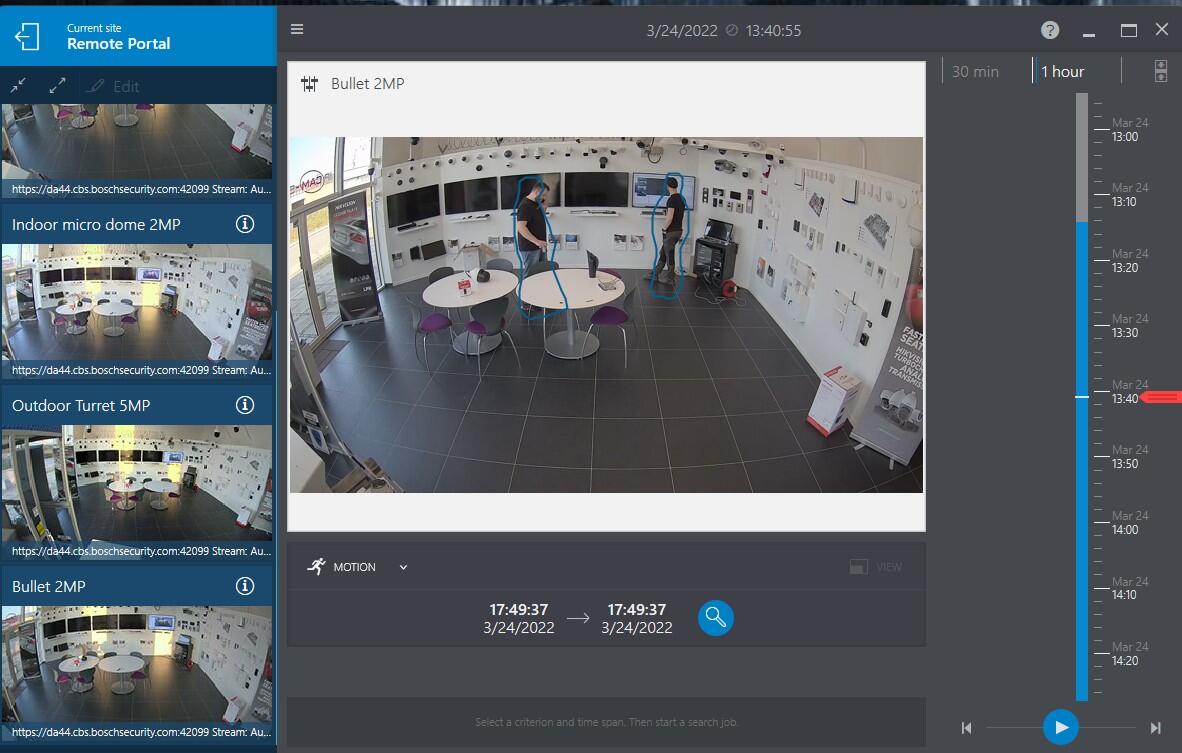
A Bosch surveillance camera packed with intelligent analytics.
The camera is equipped with a total of 16 different types of VCA (Video Content Analysis).
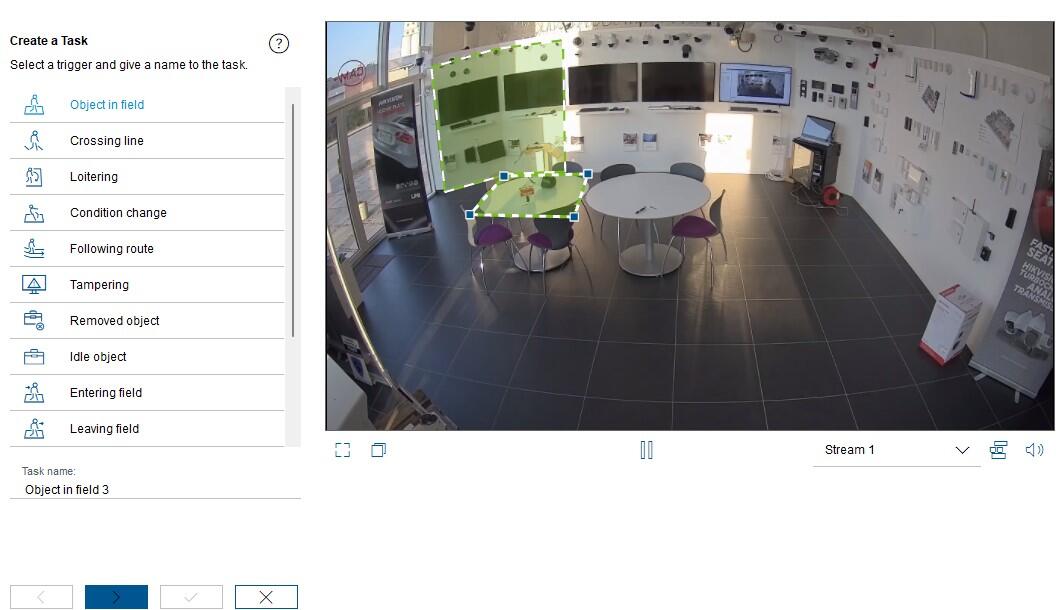
- Object in field (object appears in an area).
- Crossing line (an object crosses a line).
- Loitering (staying in an area).
- Condition change (change in conditions).
- Following router (object moves outside the specified route).
- Tampering (attempted manipulation).
- Removed object (object is removed from a specified position).
- Idle object (an object is left behind).
- Entering field (object moves into an area).
- Leaving field (object leaves an area).
- Similarity search (objects appear similar).
- Crowd detection (objects gather in groups).
- Counter (counts how many objects cross a line).
- Occupancy (queue counter).
- Traffic incidents (traffic incidents).
- Traffic wrong way (wrong-way traffic).
All these analytics are available in all Bosch surveillance cameras and help make Bosch one of the best and most widely used European surveillance camera brands. You can read more about the possibilities with "Forensic Search" here:
Standalone, closed Bosch system or part of third-party systems, this camera can do it all.
SD card: With an SD card, you can easily view all your recordings directly in the Bosch Security App - completely free and without removing the card from the camera. The camera also monitors the condition of the SD card and warns you if it starts to wear out or becomes damaged. This solution is just as user-friendly as a traditional hard disk recorder.
Bosch NVR: If you need a larger overall solution, the camera can be connected to a Bosch DIVAR hard disk recorder or via ONVIF to a third-party recorder.
VMS platform: The camera can also be integrated with VMS platforms such as Milestone, Genetec, or other systems via either Private protocol or ONVIF. However, to make full use of the camera’s metadata, you should check the list of supported cameras on your chosen VMS platform.

Power over Ethernet
Power over Ethernet
Den professionelle måde at levere strøm, til et PoE-kamera, er gennem netværkskablet.
På den måde behøver man kun at trække et enkelt kabel til hvert kamera - og skal ikke døje med 230V og små strømforsyninger.
Strømmen til kameraet leveres gennem netværkskablet fra enten...
- en optager med indbygget PoE, også kaldet NVR. Et typisk valg for installationer op til og med 8 kameraer.
- en PoE-switch. Populært fortalt en fordelerdåse til netværkskabler. Det typiske valg på store installationer eller hvis man ønsker fleksibel kabelføring.
- en PoE-injector. Kan kun levere strøm til et kamera.
Af samme grund følger der ikke strømforsyning med PoE-kameraer. Du kan bestille en klassisk strømforsyning her, hvis du ikke ønsker at benytte PoE.